23
2015
Monodevelop Scripting API search help
 An article by
You can assign F1 key as Unity scripting API search in MonoDevelop:
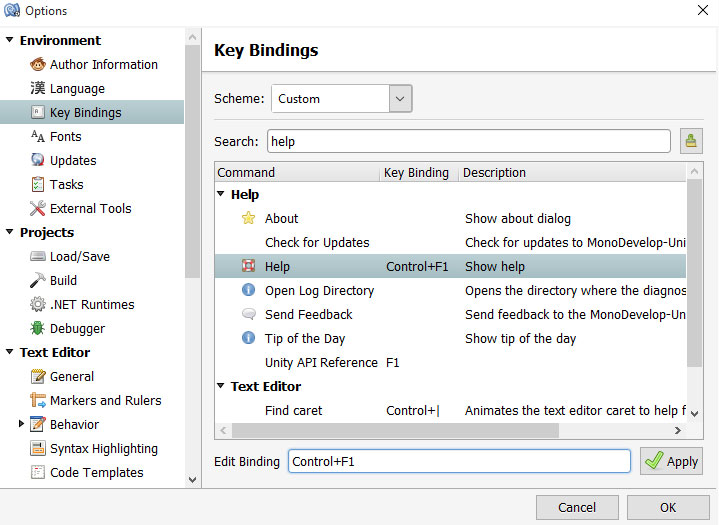
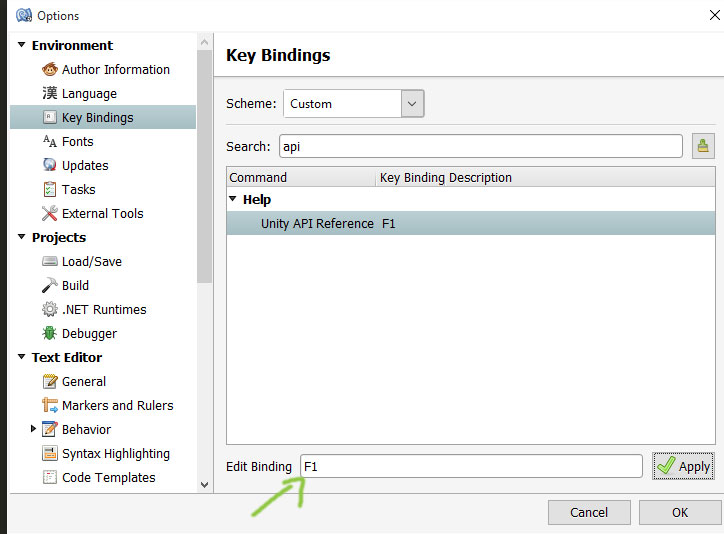
– Tools / Options
– Key Bindings
– First remove F1 key from Help, assign some other key for it like control+F1
– Then assign F1 for the Unity API Reference
– Done! Now in Monodevelop, when your press F1, the keyword at cursor position is automatically searched from unity scripting docs (opens in new browser)
* Other useful keybindings: Find References & Go to Declaration (I usually map those to § and ctrl+§ keys, instead of the default F12’s)
** Sometimes searching is bugged, like in “GetComponent<NavMeshAgent>();”, if your cursor is at NavMeshAgent it tries to search whole GetComponent<>.., then have to select with mouse the NavMeshAgent and press F1.

—
—

Opens help page : http://docs.unity3d.com/ScriptReference/30_search.html?q=NavMeshAgent


Related Posts


Leave a comment
Recent posts
- Editor Tool: Scene Size Analyzer
- LudumDare 60: Old Tech
- uBasic Scripting Language for Unity
- GreaseMonkey+Editor Plugin: 1-Click Copy script from ChatGPT (Web) to Unity Editor (as script)
- Editor Tool: Property Watcher
- .unityignore : Hide files from Project window
- PostBuild Script to Create Single exe Standalone File
- Game Loop Designer
- Favorites in PackageManager
- LudumDare59 : Signal
- Unity Editor: Tree Generator
- Leaf/Foliage Generator Tools (Runs in Browser)
Connect


Recent Comments
Coin:
CUgDSbRqFcAumDSAcdKDvuXsw26VdkJe8C8WGUQHBAGS