4
2024
Install Android SDK+JDK+NDK for Unity (without AndroidStudio or Unity Hub)
 An article by
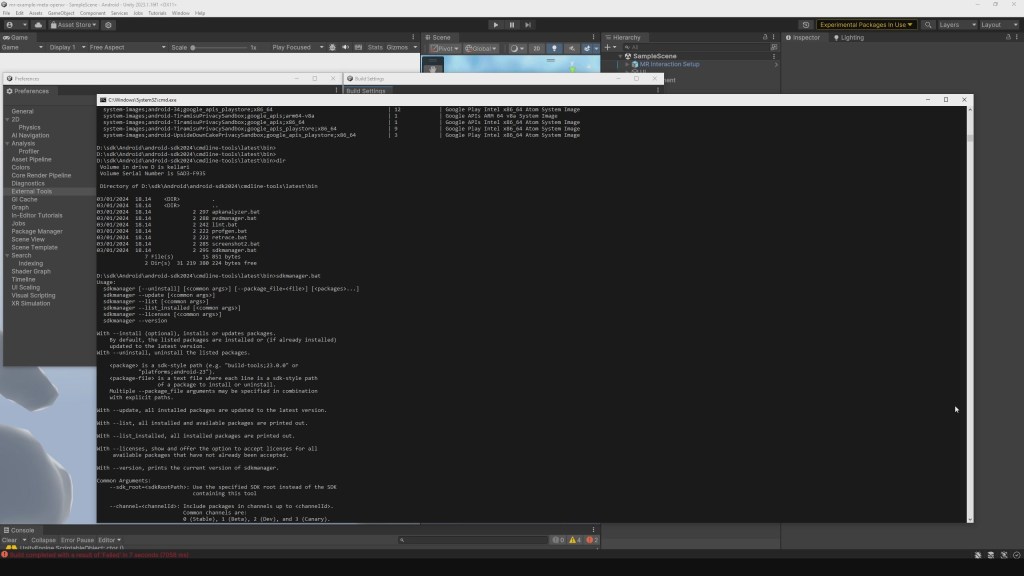
I just wanted to build Quest 3 XR demo apk quickly.. but ended up fighting with android sdk installations.
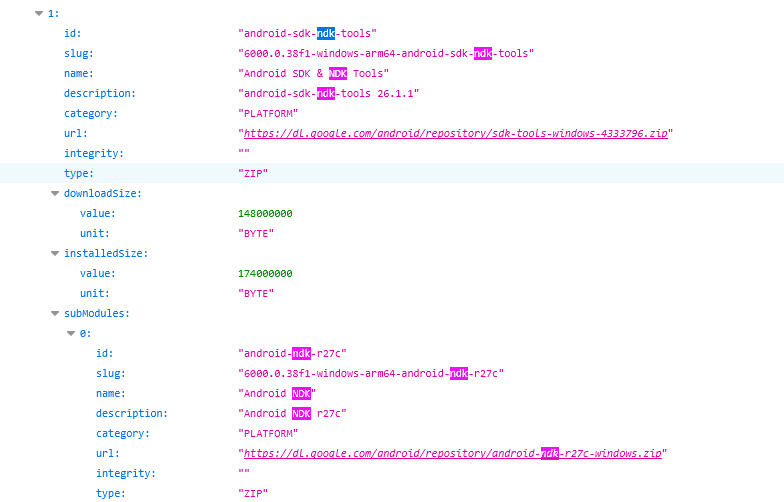
** NEW 2025: This is way easier method to find correct SDK/JDK/NDK versions,
– Go to https://services.api.unity.com/unity/editor/release/v1/releases?order=RELEASE_DATE_DESC&limit=1&version=6000.0.38
– Adjust your unity version for the search URL
– Press Expand All (in json results view)
– Search (ctrl+f) for NDK or SDK or JDK, and you should find direct download links!
STEPS
- You need to have android sdk already (the older version, you can try this: https://dl-ssl.google.com/android/repository/tools_r25.2.5-windows.zip *i’m using this https://www.dropbox.com/s/aqze528vj59ka7i/android-sdk-with-sdk-manager.7z?dl=1 )
- optionally: check if this works or helps, https://stackoverflow.com/questions/43685301/how-to-install-the-gui-android-sdk-manager-without-installing-android-studio/51429889#51429889
- download jdk-11.0.14 from https://www.oracle.com/java/technologies/javase/jdk11-archive-downloads.html
- get temp oracle login from https://bugmenot.com/view/oracle.com
- I picked “Windows x64 Installer” and installed to default location
- maybe not needed: install JRE update from https://www.java.com/en/download/ (had “1.8.0_202” earlier, now its “1.8.0_391”), installed into default location
- download android-ndk-r23b from https://dl.google.com/android/repository/android-ndk-r23b-windows.zip
- unzipped it to some location
- download commandline tools for windows: https://dl.google.com/android/repository/commandlinetools-win-10406996_latest.zip *although i later downloaded older version from https://web.archive.org/web/20230613204636if_/https://dl.google.com/android/repository/commandlinetools-win-9477386_latest.zip (but probably the latest version would had worked also)
- unzip into your old android SDK folder, i had old SDK in D:\sdk\Android\android-sdk\, so i unzipped latest command line tools into: D:\sdk\Android\android-sdk\cmdline-tools\
- create folder structure, so that your files are inside “latest” folder, in: D:\sdk\Android\android-sdk\cmdline-tools\latest (so latest folder has the bin/, lib/, notice.txt, source.properties)
- confirm that %JAVA_HOME% points into new JDK11, test with cmd prompt: echo %JAVA_HOME% (i had it pointing into old folder, C:\Program Files\Java\jdk1.8.0_202, edited Windows Environmental variables to use new folder: C:\Program Files\Java\jdk-11.0.14)
- install build tools:
- Test if unity accepts your folders in preferences now: JDK = D:\sdk\Android\jdk-11.0.14 , SDK = D:\sdk\Android\android-sdk , NDK = D:\sdk\Android\android-ndk-r23b
- Test building, for me it asked to upgrade some platform tools, clicked ok.
TROUBLESHOOTING
sdkmanager.bat says: “.. been compiled by a more recent version of the Java Runtime (class file version 55.0), this version of the Java Runtime only recognizes class file versions up to 52.0”
your java home is probably pointing into old folder, update windows env. variable for %JAVA_HOME% (and restart commandprompt to take effect)
info about versions:
49 = Java 5
50 = Java 6
51 = Java 7
52 = Java 8
53 = Java 9
54 = Java 10
55 = Java 11
56 = Java 12
57 = Java 13
58 = Java 14
59 = Java 15
60 = Java 16
61 = Java 17
62 = Java 18
63 = Java 19
64 = Java 20
65 = Java 21
https://stackoverflow.com/a/47457251/5452781RESOURCES:
If you need to find SDK downloads for your unity version, can check unity releases API
https://services.api.unity.com/unity/editor/release/v1/releases?limit=25&offset=0
And inside JSON, search for your unity version and see SDK download links.
(adjust offset to get older versions)
Video:


Related Posts


2 Comments + Add Comment
Leave a comment
Recent posts
- Editor Tool: Property Watcher
- .unityignore : Hide files from Project window
- PostBuild Script to Create Single exe Standalone File
- Game Loop Designer
- Favorites in PackageManager
- LudumDare59 : Signal
- Unity Editor: Tree Generator
- Leaf/Foliage Generator Tools (Runs in Browser)
- Testing Unity AI Beta
- Ways to Support UnityCoder Development
- Using UI Slider to Create 5-Star Rating Element
- Game Music Library For Unity (editor plugin)
Connect


Recent Comments
Coin:
CUgDSbRqFcAumDSAcdKDvuXsw26VdkJe8C8WGUQHBAGS
how to install sdk and other on 2021 unity version
i’m still using this setup on latest unity versions like 2023.x (maybe haven’t tested in 6000.0 yet)