5
2012
Bitmap2Mesh (release v3.0)
 An article by
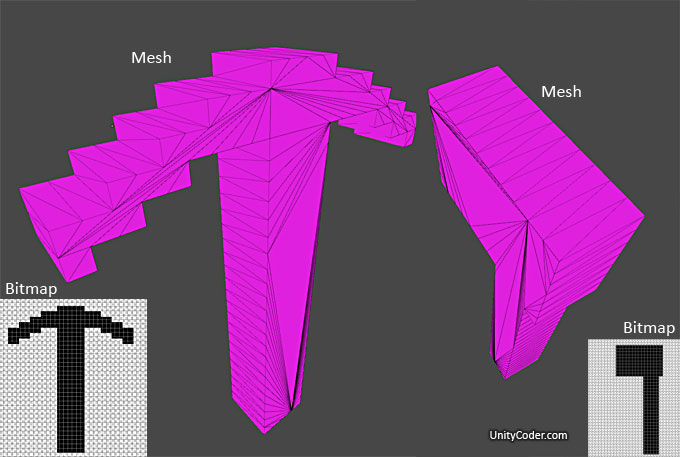
Bitmap to 3D Extruded Mesh-script. Related to this forum topic (unity forum link)
What it is?
It reads bitmap pixel by pixel, checks if pixel alpha value is > 0, then add vertice there (but skip adding, if we are going the same direction) (it follows the shape border, currently just 1 shape is scanned..)
Then it uses Triangulator from unifywiki and This extrude script from unity forums to make it 3D.*
*Re-wrote the extrusion connection, now its using Unity Examples Procedural-extrusion. (which can be also used to extrude in multiple sections)
TODO:
– Optimization, clean up (or dont add) too many vertices, if its a straight line (done, using kind of “RLE”)
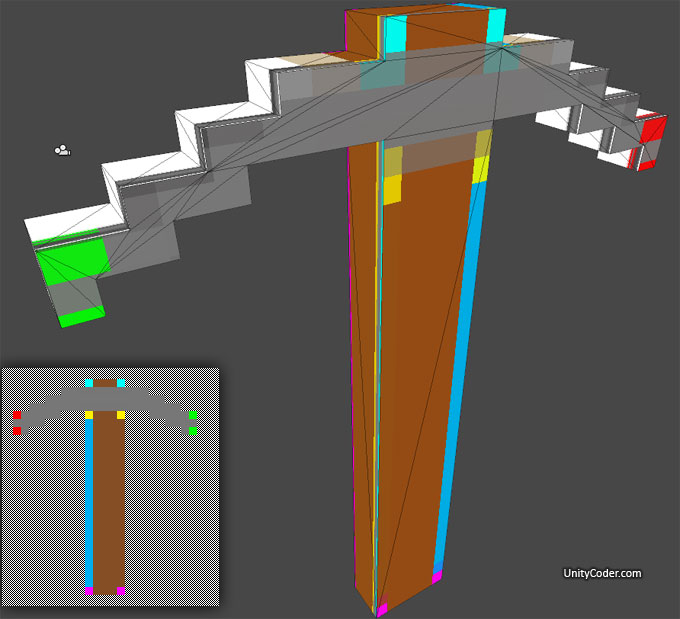
– UV mapping.. problem if you try to add textures to this version (Planar UV map works, not sure how to make others, * Testing Custom UV mapping, works bit better)
– Some error checking, havent tried yet what happens if you make multiple objects in the bitmap..or holes..? (It only detects the first object that it hits, when scanning pixels)
– Pivot location (see update note #2)
– Scaling (currently its 1pixel = 1unit..) (see update note #2)
– Last vertice / triangle /uv is sometimes broken? (hopefully fixed, 1.2.2012, see update note #1)
– Model is mirrored / upside down?
– Proper UV mapping / texturing (bake vertex colors? special shader: 2 materials, use vertex color as mask?)
– Support multiple shapes (submeshes, combine meshes?)
– Use bitmap image as texture directly (possible after proper UV’s are done?) (works, just need to remove extra variable..)
– Fix scanning: breaks if there is not atleast 1 pixel empty margin around the image.. (done)
– Cannot scan diagonal pixels or too thin lines.. (Now works)
– Single pixels coming out from the shape are not correctly square (need to add extra vertex function there later..)
– Need to do scaling for gameObject, instead of pixels..(?)
– Make the whole thing as a function/class.. so you can call it and pass the bitmap image, settings as a variables
FUTURE IDEAS:
– Make pixel texture painter script, so you can paint your weapon and click “extrude to 3D” (test version done, not so useful yet..)
– Take extrude depth from alpha or color value? So you could make it a bit less blocky?
– Bake texture to vertex colors? (would need more vertices..?)
– Make it as unity editor script?
– Make it as online page (you draw / upload bitmap, it creates you the mesh to download, as .obj or …)
*Update#1 (1.2.2012)
This fixed the uv/triangle problem in some cases,
Find these 2 lines:
triangles[count_tris+4] = n + poly.Length;
triangles[count_tris+5] = i + poly.Length;
replace with these 2 lines: (swaps 4 and 5)
triangles[count_tris+5] = n + poly.Length;
triangles[count_tris+4] = i + poly.Length;
*Update#2 (2.2.2012)
If you want to set pivot point to first encountered pixel(vertex)
and to set the scale (currently 1 pixel = 1 unit), do it here:
Find line:
polys.Push(scanpoint);
Replace with: (you could make the “0.1” (=pixelscale) as public variable, so you can easily adjust it later
polys.Push((scanpoint-startpoint)*0.1);
*Update#2 (4.2.2012)
Custom UV mapping & texturing.. (see image#3)
need to clean it up a bit and do testing before upload..
*Update#3 (5.2.2012)
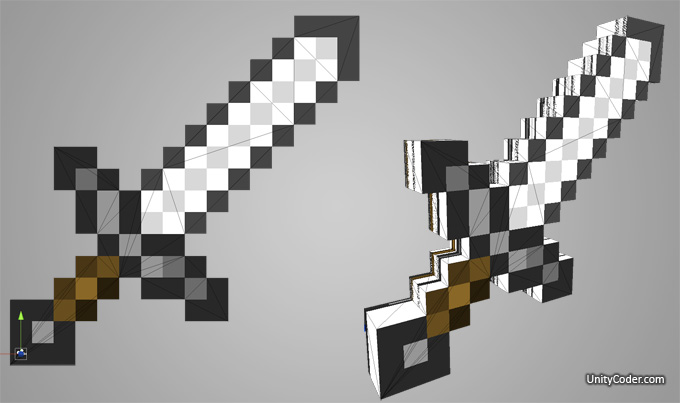
Updated the pixel scanning system, now its more robust and takes the outer edge of pixel as vertex location (not the pixel midpoint..)
See image#4, original minecraft sword extruded & textured.
Added v2 download for testing..
*Update#4 (9.2.2012)
Now UV mapping works on most cases
Added v3 download link to the toolbar
Download source: (js + c#)
mBitmapToMesh,unitypackage v1.0
mBitmap2Meshv20,unitypackage v2.0
mBitmap2Meshv30.unityPackage v3.0
Additional images:
Image#2: Optimized vertices (compare to the main image)

Image#3: Automatic UV mapping and texturing (using the original bitmap).. bit off, but close enough for now..
—
Image#4: Original minecraft sword .png, extruded to 3D (same image as texture) *Sword image © Mojang/Minecraft
(Sides still have UV mapping problems..)


Related Posts


16 Comments + Add Comment
Leave a comment
Recent posts
- Adding Real World Location to Ice Fishing Prototype
- [web tool] Image Channel Inspector : AlphaScope
- Editor Tool: Smart Recompile (don’t recompile if edit comments)
- Editor Tool: Scene Size Analyzer
- LudumDare 60: Old Tech
- uBasic Scripting Language for Unity
- GreaseMonkey+Editor Plugin: 1-Click Copy script from ChatGPT (Web) to Unity Editor (as script)
- Editor Tool: Property Watcher
- .unityignore : Hide files from Project window
- PostBuild Script to Create Single exe Standalone File
- Game Loop Designer
- Favorites in PackageManager
Connect


Recent Comments
Coin:
CUgDSbRqFcAumDSAcdKDvuXsw26VdkJe8C8WGUQHBAGS
Going to try new version with ChunkMethod, similar to this > http://unitycoder.com/blog/2012/02/15/dummy-craft-chunk-renderer-js/
Then you should be able to have holes also.
Hi,
I keep receiving a “The type “Triangulator” does not have a visible constructor that matches the arguement list ‘(UnityEngine.Vector2[])’
I downloaded both Triangulator JS and c# versions from the linked wiki and added them as scripts in my project but that error keeps popping up and stopping even your sample scene from working.
Any ideas on a fix?
Did you try putting Triangulator.cs to Plugins folder?
yes, indeed triangulator was not included in v.3 project, will have to find it in v1, to import v1 and then v3. … you did alot of work on the extrusion.cs code, very impressed! it’s pretty difficult, i m amazed you managed to code uv’s ok using the extrusion interation(s). for this purpose i would have chosen a box projection of textures relative to me mesh facing dirs, i have a code for it i have to upload it to the asset store. amazing coding. lots of thanks
Link expired 🙁 Shame, I would have really liked to have used this!
^ did you managed to download it? (it should work, just the timeout is currently bit too fast..)
3D-Mesh-from-Texture:
http://forum.unity3d.com/threads/61978-3D-Mesh-from-Texture
I did! You were correct, the timeout is quick!
Draw Polygon2D Collider paths around a 2D Mesh:
http://forum.unity3d.com/threads/solved-draw-polygon2d-collider-paths-around-a-2d-mesh.334039/#post-2164071
Generating 3D item drops from 2D sprites
http://answers.unity3d.com/questions/814993/generating-3d-item-drops-from-2d-sprites.html
tool made to create simple meshes from image textures based on transparency
http://games.ucla.edu/resource/unity-mesh-creator-2/
new link
https://github.com/uclagamelab/MeshCreator
Unity utility for converting a 2D sprite to a 3D voxel mesh
https://github.com/jantepya/Unity-Sprite-Voxelizer
pixels to mesh (some old script)
https://forum.unity.com/threads/3d-mesh-from-texture.61978/#post-399312
Unity Sprite Mesh Extension
https://github.com/sr4dev/Unity-SpriteAssist
Extrude 2D Sprite into 3D Mesh
https://forum.unity.com/threads/how-to-convert-2d-lines-in-to-a-same-exact-shape-of-a-3d-object.870823/#post-6809294
Generating 3D item from 2D sprites
https://discussions.unity.com/t/generating-3d-item-drops-from-2d-sprites/120223/3