Jan
4
2012
4
2012
Fake 2D Realtime Raycast Shadows (for unity free version)
 An article by

Testing another way of doing realtime 2D shadows, by casting rays from the player position, then create “light” polygon to the area where we can see.
More info later, need to test few things (using setpixels & shader? or using different shader for better light effect with polygon plane)
Webplayer:
http://unitycoder.com/upload/demos/mShadowRayScan1/ (added 10.1.2012)
Download source:
mRayCastShadowTest.unityPackage
More test images:
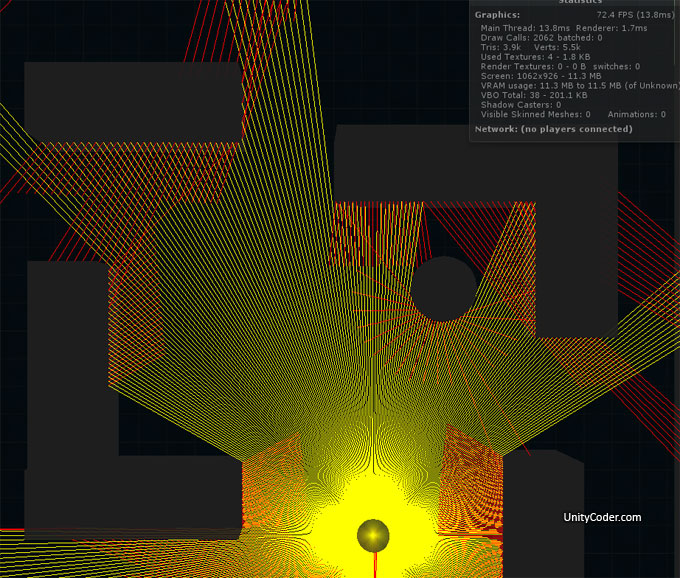
Rays with 1 bounce (so we get light behind the corners also..red color is bounced light ray, using 512 rays for this image, using Debug.DrawLine)
Did you enjoy this article? Share it!


Related Posts


8 Comments + Add Comment
Leave a comment
Recent posts
- Editor Tool: Property Watcher
- .unityignore : Hide files from Project window
- PostBuild Script to Create Single exe Standalone File
- Game Loop Designer
- Favorites in PackageManager
- LudumDare59 : Signal
- Unity Editor: Tree Generator
- Leaf/Foliage Generator Tools (Runs in Browser)
- Testing Unity AI Beta
- Ways to Support UnityCoder Development
- Using UI Slider to Create 5-Star Rating Element
- Game Music Library For Unity (editor plugin)
Connect


Recent Comments
Support my work at Bags.fm:
Coin:
Coin:
CUgDSbRqFcAumDSAcdKDvuXsw26VdkJe8C8WGUQHBAGS
Subscribe to Blog via Email
Tag Cloud
2d
3D
AI
algorithm
android
asset
build
color
custom
demo
editor
effect
fake
free
game
generator
greasemonkey
indie
javascript
light
line
ludumdare
mesh
paint
particles
physics
plugin
procedural
proto
prototype
script
sea
shader
shadow
sprite
terrain
texture
tutorial
ui
unity
vertex
visibility
water
waves
webgl
Added webplayer demo v1.0
-Interesting method, how is performance/# of rays?
(this would be very useful for me if the ray# can be high. i want to draw a cone of sight with this but for the edges of obstacles in great distances the gap between rays would be to high i guess…)
-is it possible to create this as a cutoutpolygon for a already placed shadowpolygon?
Added source download (had forgotten to upload it)
So you can test it.. (I’ve only tested on this small scene)
Actually, theres no need to triangulate it every frame, for example
if you use this kind of mesh (every triangle connects to the middle always)
http://unitycoder.com/blog/2012/01/06/noob-triangulator-js/
Then all you need to do is,
– Do scan
– Modify vertices
(saves creating: “uv maps”, “triangulation” etc.. from the Update loop)
New test version, much faster: http://unitycoder.com/upload/demos/mShadowRayScan2/
This looks amazing!
Do you have the source for that second much faster version?
Yes, its this one: http://unitycoder.com/blog/2012/02/15/raycast-realtime-visibility-2-0/
thanks! This works so well. Is there a way to limit the raycasting to just one specific object?