Jan
14
2012
14
2012
Walking Block Rotation
 An article by

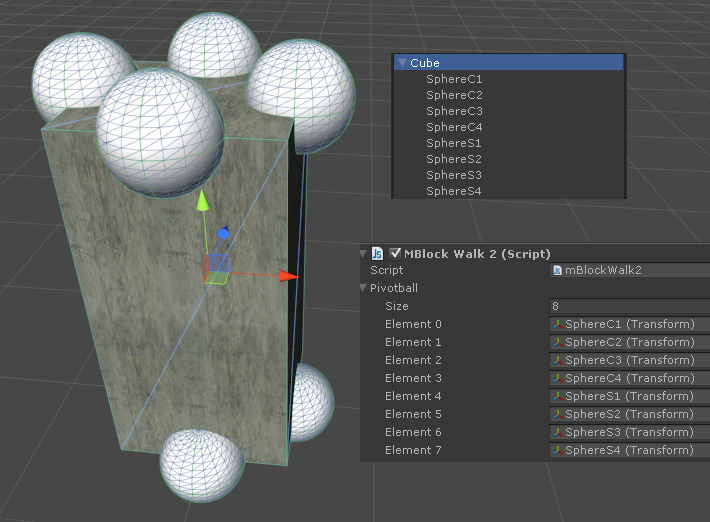
Testing rotating / walking block code.. (as seen in many puzzle games)
Current progress:
– Screenshot: Step.1 and Step.2 (going towards right direction)
– Can walk one direction..
– Need to add smooth movement (now it rotates 90 degrees instantly)
*This one failed.. not going to fix it
(if you want the demo, I can post.. but it only works in 2 directions)
Source (javascript)
public var pivotball:Transform[];

function Update ()
{

	if (Input.GetKeyDown("a")) // left
	{
		// function RotateAround (point : Vector3, axis : Vector3, angle : float) : void

		var axis = Vector3(0,0,1);
		var n = 0;
		// which point is lowest, in that direction?
		for (var i:int=0;i<pivotball.length;i++)
		{
			if (pivotball[i].position.y<transform.position.y)
			{
				if (pivotball[i].position.x<transform.position.x)
				{
					n=i;
					break;
				}
			}
		}

		transform.RotateAround (pivotball[n].position,axis, 90);
	}

	if (Input.GetKeyDown("d")) // right
	{
		var n2=0;
		for (var i2:int=0;i2<pivotball.length;i2++)
		{
			if (pivotball[i2].position.y<transform.position.y)
			{
				if (pivotball[i2].position.x>transform.position.x)
				{
					n2=i2;
					break;
				}
			}
		}

		var axis2 = Vector3(0,0,1);
		transform.RotateAround (pivotball[n2].position,axis2, -90);
	}

	if (Input.GetKeyDown("w")) // up
	{
		var n3=0;
		for (var i3:int=0;i3<pivotball.length;i3++)
		{
			if (pivotball[i3].position.y<transform.position.y)
			{
				if (pivotball[i3].position.z>transform.position.z)
				{
					n3=i3;
					break;
				}
			}
		}

		var axis3 = Vector3(1,0,0);
		transform.RotateAround (pivotball[n3].position,axis3, 90);
	}

	if (Input.GetKeyDown("s")) // down
	{
		var n4=0;
		for (var i4:int=0;i4<pivotball.length;i4++)
		{
			if (pivotball[i4].position.y<transform.position.y)
			{
				if (pivotball[i4].position.z<transform.position.z)
				{
					n4=i4;
					break;
				}
			}
		}

		var axis4 = Vector3(1,0,0);
		transform.RotateAround (pivotball[n4].position,axis4, -90);
	}


}
Screenshot:
Did you enjoy this article? Share it!


Related Posts


2 Comments + Add Comment
Leave a comment
Recent posts
- Editor Tool: Property Watcher
- .unityignore : Hide files from Project window
- PostBuild Script to Create Single exe Standalone File
- Game Loop Designer
- Favorites in PackageManager
- LudumDare59 : Signal
- Unity Editor: Tree Generator
- Leaf/Foliage Generator Tools (Runs in Browser)
- Testing Unity AI Beta
- Ways to Support UnityCoder Development
- Using UI Slider to Create 5-Star Rating Element
- Game Music Library For Unity (editor plugin)
Connect


Recent Comments
Support my work at Bags.fm:
Coin:
Coin:
CUgDSbRqFcAumDSAcdKDvuXsw26VdkJe8C8WGUQHBAGS
Subscribe to Blog via Email
Tag Cloud
2d
3D
AI
algorithm
android
asset
build
color
custom
demo
editor
effect
fake
free
game
generator
greasemonkey
indie
javascript
light
line
ludumdare
mesh
paint
particles
physics
plugin
procedural
proto
prototype
script
sea
shader
shadow
sprite
terrain
texture
tutorial
ui
unity
vertex
visibility
water
waves
webgl
Rolling cubes one space and one rotation at a time, with a delay:
http://answers.unity3d.com/questions/8255/rolling-cubes-one-space-and-one-rotation-at-a-time.html
using physics
https://github.com/zalo/MathUtilities/blob/master/Assets/Rolling/RollingCube.cs#L11-L15