Jan
20
2012
20
2012
Wipe transition (Shader)
 An article by
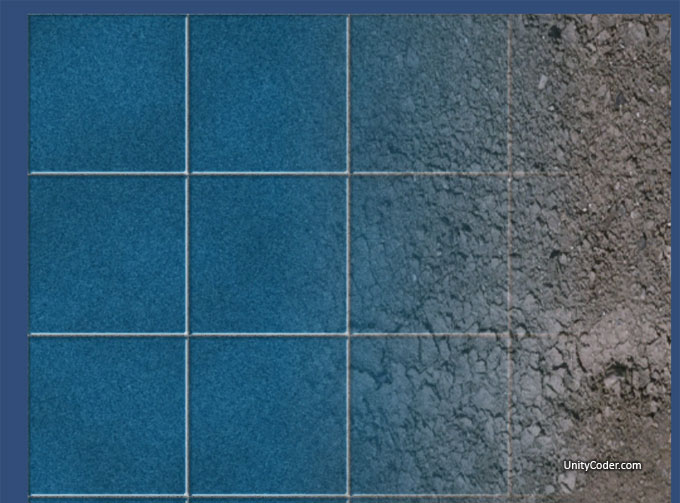
Wipe shader test.. Modified unity version from the original glsl shader “postpro” by iq (2009)
Webplayer:
http://unitycoder.com/upload/demos/mWipeShader/
Source: (shader)
// Modified Unity version - WipeShader - mgear - http://unitycoder.com/blog/
// ORIGINAL GLSL SHADER "Postpro" WAS MADE BY: iq (2009)

Shader "mShaders/mWipe1"
{
Properties
{
_tex0 ("Texture1", 2D) = "white" {}
_tex1 ("Texture2", 2D) = "white" {}
}

SubShader
{
Tags {Queue = Geometry}
Pass
{
CGPROGRAM
#pragma target 3.0
#pragma vertex vert
#pragma fragment frag
#include "UnityCG.cginc"

sampler2D _tex0;
sampler2D _tex1;

struct v2f {
float4 pos : POSITION;
float4 color : COLOR0;
float4 fragPos : COLOR1;
float2  uv : TEXCOORD0;
};

float4 _tex0_ST;

v2f vert (appdata_base v)
{
v2f o;
o.pos = mul (UNITY_MATRIX_MVP, v.vertex);
o.fragPos = o.pos;
o.uv = TRANSFORM_TEX (v.texcoord, _tex0);
o.color = float4 (1.0, 1.0, 1.0, 1);
return o;
}

// I dont really have idea whats happening here..its a bit modified version from the original shader
half4 frag (v2f i) : COLOR
{
float animtime = _Time*10.0;
float2 q = i.uv.xy / float2(1,1);
float3 oricol = tex2D (_tex0,float2(q.x,q.y)).xyz;
float3 col = tex2D (_tex1,float2(i.uv.x,i.uv.y)).xyz;
float comp = smoothstep( 0.2, 0.7, sin(animtime) );
col = lerp(col,oricol,  clamp(-2.0+2.0*q.x+3.0*comp,0.0,1.0)); // ??
return float4(col,1);
}
ENDCG
}
}
FallBack "VertexLit"
}
Did you enjoy this article? Share it!


Related Posts


4 Comments + Add Comment
Leave a comment
Recent posts
- Game Loop Designer
- Favorites in PackageManager
- LudumDare59 : Signal
- Unity Editor: Tree Generator
- Leaf/Foliage Generator Tools (Runs in Browser)
- Testing Unity AI Beta
- Ways to Support UnityCoder Development
- Using UI Slider to Create 5-Star Rating Element
- Game Music Library For Unity (editor plugin)
- Fontastic : Easily Test Fonts in Unity Editor!
- GeoTiff Importer & Terrain Generator for Unity
- Create Baked DropShadow for UI images
Connect


Recent Comments
Support my work at Bags.fm:
Coin:
Coin:
CUgDSbRqFcAumDSAcdKDvuXsw26VdkJe8C8WGUQHBAGS
Subscribe to Blog via Email
Tag Cloud
2d
3D
AI
algorithm
android
asset
build
color
custom
demo
editor
effect
fake
free
game
generator
greasemonkey
indie
javascript
light
line
ludumdare
mesh
paint
particles
physics
plugin
procedural
proto
prototype
script
sea
shader
shadow
sprite
terrain
texture
tutorial
ui
unity
vertex
visibility
water
waves
webgl
cleaned up version with alpha support:
http://stackoverflow.com/a/21968380
Hey, I’ve been learning Unity3D these days. And I’m very interested in your work. But I cannot understand your code here. Could you please send the unity3d source code to me about the wipe transition effect? I would very very appreciate you!! I hope to have more communications with you.
My e-mail address is zhouxuanc@foxmail.com.
THX a lot!!!
Hi,
It’s a shader source code, so:
First create new shader file from menu: Assets / Create / Shader
Then copy paste that code there,
Then create new material from menu: Assets / Create / Material
Then assign that shader to the new material (using the Shader dropdown in inspector, when the material file is selected from Project panel)
And google for: unity3d shader tutorial
for example,
https://cgcookie.com/unity/cgc-courses/introduction-to-surface-shaders-in-unity/
then you can learn how to modify it etc.
I see! Thank you for your prompt reply!