16
2014
Overlay Diffuse Shader
 An article by
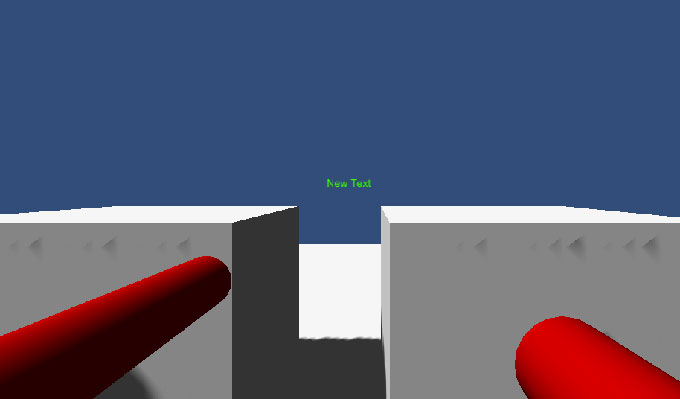
<<< Left : Overlay shader | >>> Right : Default diffuse shader
Problem:
– Players gun clips through walls and objects (since it has no collider and player can walk next to the wall)
Solutions:
– Use 2 cameras (like in the http://unity3d.com/learn/live-training/session/merry-fragmas-multiplayer-fps-part-1 ), can be also used to draw other necessary effects on the same 2nd overlay camera (like muzzle flash)
– Modified shader that draws the gun on top of other objects (more info: http://docs.unity3d.com/Manual/SL-SubshaderTags.html )
– Collider in the gun (but might cause problems when turning etc.)
Shader source: (DiffuseOverlay.shader)
Shader "Custom/DiffuseOverlay" {
Properties {
    _Color ("Main Color", Color) = (1,1,1,1)
    _MainTex ("Base (RGB)", 2D) = "white" {}
}
SubShader {
    // Tags {"RenderType"="Opaque"} // original
    Tags {"Queue" = "Overlay" "RenderType"="Opaque"} // modified
    ZTest Always // this line is added
    LOD 200

CGPROGRAM
#pragma surface surf Lambert

sampler2D _MainTex;
fixed4 _Color;

struct Input {
    float2 uv_MainTex;
};

void surf (Input IN, inout SurfaceOutput o) {
    fixed4 c = tex2D(_MainTex, IN.uv_MainTex) * _Color;
    o.Albedo = c.rgb;
    o.Alpha = c.a;
}
ENDCG
}

Fallback "VertexLit"
}


Related Posts


3 Comments + Add Comment
Leave a comment
Recent posts
- Editor Tool: Property Watcher
- .unityignore : Hide files from Project window
- PostBuild Script to Create Single exe Standalone File
- Game Loop Designer
- Favorites in PackageManager
- LudumDare59 : Signal
- Unity Editor: Tree Generator
- Leaf/Foliage Generator Tools (Runs in Browser)
- Testing Unity AI Beta
- Ways to Support UnityCoder Development
- Using UI Slider to Create 5-Star Rating Element
- Game Music Library For Unity (editor plugin)
Connect


Recent Comments
Coin:
CUgDSbRqFcAumDSAcdKDvuXsw26VdkJe8C8WGUQHBAGS
Using 2 cameras to avoid gun going through walls:
Tanks, Tanks very much, this code solve my poblem.
Tankyful
Thanks, very useful shader, : )