27
2014
Legacy Character To Mecanim (+navPaths)
 An article by

Legacy Character to Mecanim (+navpath)
*This is just extra notes for the Mecanim Navpath Project, to add new characters easily (from old rigged characters) :
http://unitycoder.com/blog/2014/12/23/mecanim-nav-mesh-pathfinding/
TUTORIAL
– Download some rigged character from Asset Store
– I’ve tested these ones to work fine so far, they work fine:
(Soldier) https://www.assetstore.unity3d.com/en/#!/content/122
(Monster) : https://www.assetstore.unity3d.com/en/#!/content/2558
(Tiny warrior) : https://www.assetstore.unity3d.com/en/#!/content/16070 *Already mecanim
– Import character to the project [see image#2]
– Select, for example, that soldier from the Project window
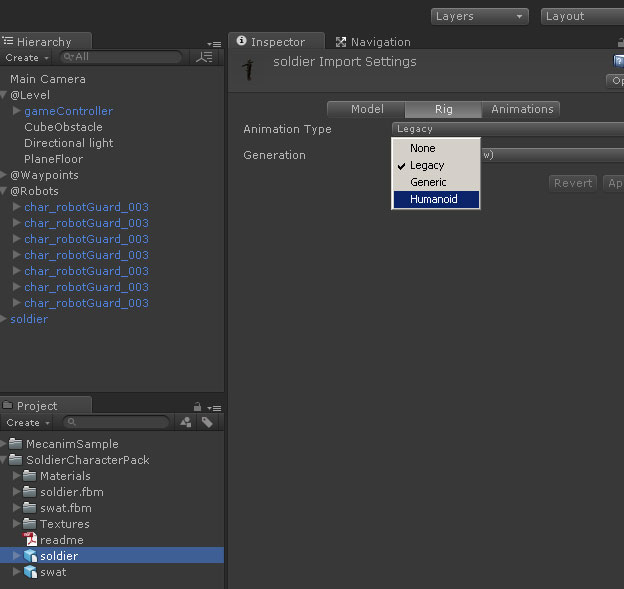
– In the Inspector, Rig tab: Set Animation type to: Humanoid [see image#3]
– [x] Optimize game objects (not sure what it does but why not..)
– Hit Apply
– Drag & Drop the character to scene (use the example scene) [see image#4]
– Copy all the components from the example “char_robotGuard_003” character into the soldier gameobject
– In the Animator component, assign: “EnemyAnimator” as the controller
– Hit play and bam! Easy, mecanim animated walking AI agent!
You could then adjust character rigidbody weight, AI speed, so that they wont all move at the same speed..
*if the character is already a mecanim one, you don’t need to do those parts in the import settings, just copy the components and assign controller.
—
image#2: importing package

—
image#3: Rig type to Humanoid
—
image#4: drag & drop character to scene

—
image#5: Copy these components to the new character (*that Sphere Collider is not used, no need to copy)
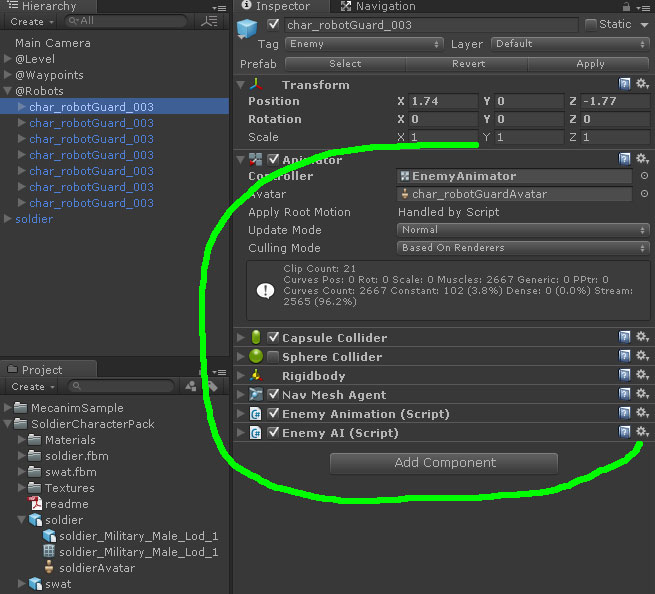
*From that small gear dropdown button, you can select “Copy Component”, have to do that 1 by 1..
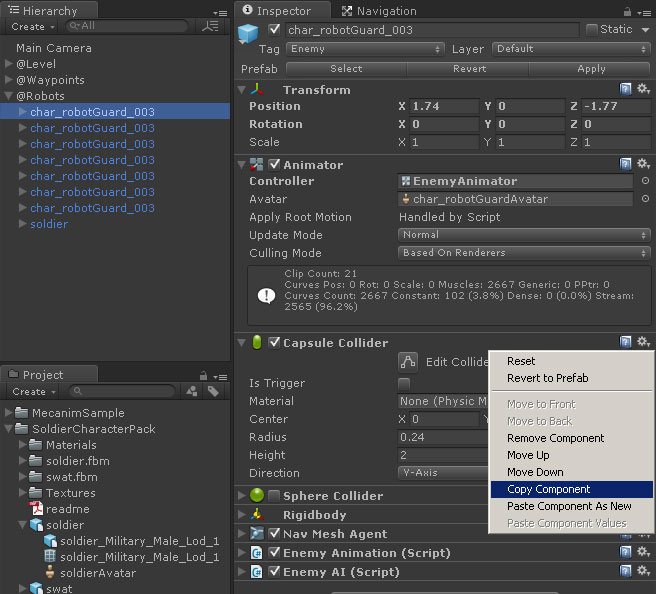
* Same gear dropdown button has the Paste option:

—
image#6: Finally assign Controller to Animator component, pick “EnemyAnimator” :


Related Posts


Leave a comment
Recent posts
- Editor Tool: Scene Size Analyzer
- LudumDare 60: Old Tech
- uBasic Scripting Language for Unity
- GreaseMonkey+Editor Plugin: 1-Click Copy script from ChatGPT (Web) to Unity Editor (as script)
- Editor Tool: Property Watcher
- .unityignore : Hide files from Project window
- PostBuild Script to Create Single exe Standalone File
- Game Loop Designer
- Favorites in PackageManager
- LudumDare59 : Signal
- Unity Editor: Tree Generator
- Leaf/Foliage Generator Tools (Runs in Browser)
Connect


Recent Comments
Coin:
CUgDSbRqFcAumDSAcdKDvuXsw26VdkJe8C8WGUQHBAGS