25
2015
Creating car mirror with rendertexture
 An article by
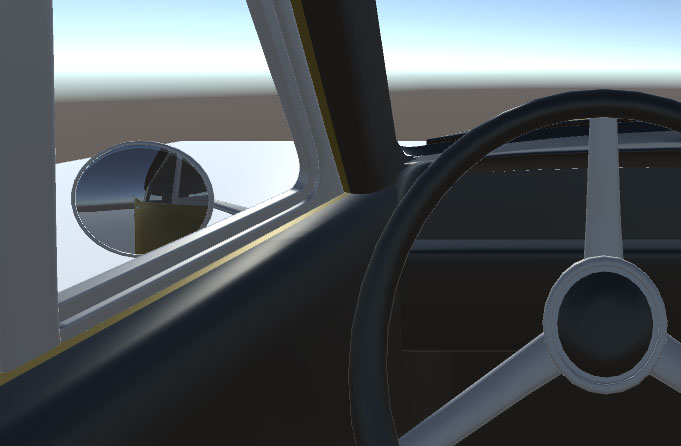
Creating simple car mirror using rendertextures.
HOW TO
– Right click at Project window, Create / RenderTexture
– Rename “New Render Texture” into something else, like “MirrorRT”
– Drag & Drop “MirrorRT” into 3D object (preferably some flat object) at scene view (it automatically creates Materials/folder and “MirrorRT” material there and assigns to the object)
– Right click at Hierarchy window, Create / Camera
– Rename “Camera” into something else, like “CameraMirror”
– Position “CameraMirror” into that 3D mirror object and rotate it so it looks toward the mirrored view direction
– Make “CameraMirror” the child of 3D mirror object, so that it follows it
– Disable [ ] GUILayer and [ ] AudioListener components from “CameraMirror”
– Optional: Adjust Clipping Plane Near values for both cameras to 0.01 or so (if your model gets gets clipped near camera)
– Select rendertexture file from Project window and Drag & Drop it into “CameraMirror” TargetTexture field
– Hit play!
EXTRAS
– Select “MirrorRT” from Project window to adjust render texture resolution & settings
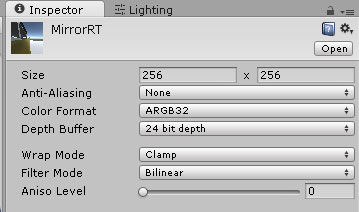
—
Resources:
– I used this free car model : http://www.turbosquid.com/FullPreview/Index.cfm/ID/717576
(had problem with the mirror mesh UV mapping, so made small script to temporarily fix it : PlanarUVMap.cs, attach it to the mesh that needs fixing)
– RenderTexture manual : http://docs.unity3d.com/Manual/class-RenderTexture.html
—
Image#1: Broken & fixed UV map (later also mirrored UV map horizontally)

—
Image#2: Posioning “CameraMirror” into mirror (on this 3D model “Chrome_20” is the mirror mesh and camera is set as child of it)


Related Posts


8 Comments + Add Comment
Leave a comment
Recent posts
- Editor Tool: Scene Size Analyzer
- LudumDare 60: Old Tech
- uBasic Scripting Language for Unity
- GreaseMonkey+Editor Plugin: 1-Click Copy script from ChatGPT (Web) to Unity Editor (as script)
- Editor Tool: Property Watcher
- .unityignore : Hide files from Project window
- PostBuild Script to Create Single exe Standalone File
- Game Loop Designer
- Favorites in PackageManager
- LudumDare59 : Signal
- Unity Editor: Tree Generator
- Leaf/Foliage Generator Tools (Runs in Browser)
Connect


Recent Comments
Coin:
CUgDSbRqFcAumDSAcdKDvuXsw26VdkJe8C8WGUQHBAGS
Hey Bro Can I ask you a question?
of course, yes
http://hizliresim.com/ZD8nOV
I’m trying to do here, but I failed as a mirror.
Try it first on default plane or quad to see if it works (because UV mapping in custom can cause problems). Also do you have the 2nd camera there somewhere?
And try adding some UV debug texture into the mirror mesh, to see if that works:
http://i70.photobucket.com/albums/i113/Huidafa/UVTextureChecker4096.png
my mirror is not the only part combined with body ?Does it create a problem?
http://s1164.photobucket.com/user/firatuckan/media/images_zpsyhimkcws.jpg.html
yeah, that will cause problems..
you could try making separate mirror mesh in Blender or other 3D software and place it there.
thats not how a mirror works. this is how a notebook webcam works.
to simulate a mirror you need to adjust your camera based on the position of the main camera
yeah good catch! have to update this scene later.