May
26
2024
26
2024
Customize SpriteShapeRenderer quality (but has issues)
 An article by
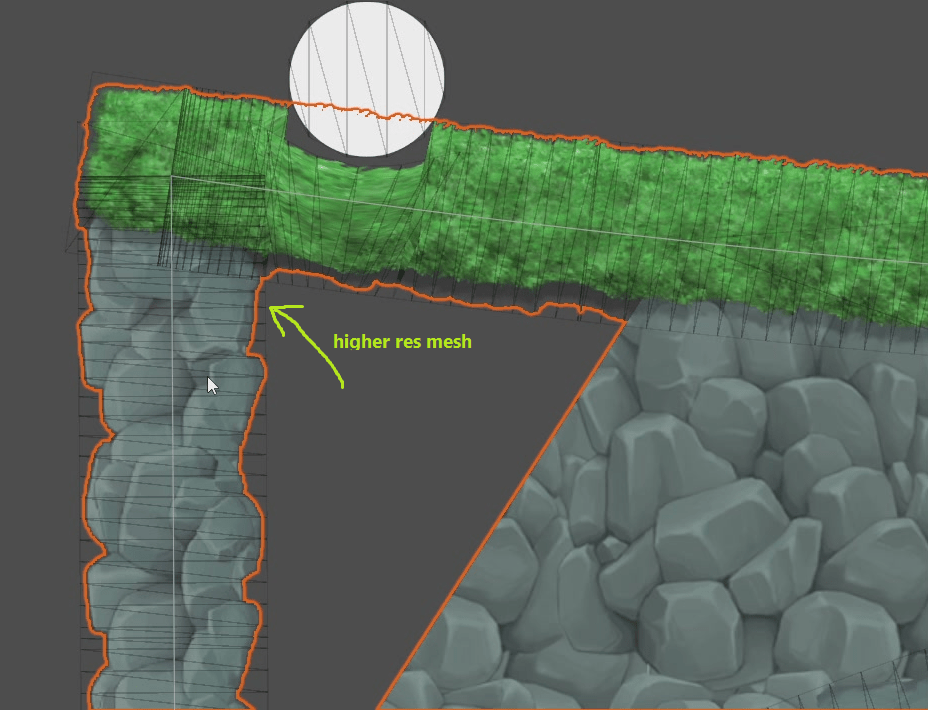
Tried using custom shader to have “bend” surface for SpriteShapeRenderer, and it works.. but the mesh is so low resolution, that it doesnt look nice.. Then tried to increase SpriteShape mesh resolution, which worked – but inner mesh and collider broke. (and didnt have time to look further..)
Steps:
- import SpriteShape Package
- Make it editable (Right click over SpriteShape in Project/Packages/, Show in Explorer)
- Move the folder from Library/PackageCache/ into project Packages/ folder
- Open com.unity.2d.spriteshape\Runtime\SpriteShapeGenerator.cs
- Modify kHighestQualityTolerance value to some higher value
- Open com.unity.2d.spriteshape\Runtime\SpriteShape.cs
- Adjust public enum QualityDetail High value to something higher (like 24)
- Get back to Unityt Editor, adjust quality dropdown to update mesh
Problems:
– Inner mesh is broken, collider is broken..
Making of
Tags: customize, spriteshaperenderer


Leave a comment
Recent posts
- Editor Tool: Property Watcher
- .unityignore : Hide files from Project window
- PostBuild Script to Create Single exe Standalone File
- Game Loop Designer
- Favorites in PackageManager
- LudumDare59 : Signal
- Unity Editor: Tree Generator
- Leaf/Foliage Generator Tools (Runs in Browser)
- Testing Unity AI Beta
- Ways to Support UnityCoder Development
- Using UI Slider to Create 5-Star Rating Element
- Game Music Library For Unity (editor plugin)
Connect


Recent Comments
Support my work at Bags.fm:
Coin:
Coin:
CUgDSbRqFcAumDSAcdKDvuXsw26VdkJe8C8WGUQHBAGS
Subscribe to Blog via Email
Tag Cloud
2d
3D
AI
algorithm
android
asset
build
color
custom
demo
editor
effect
fake
free
game
generator
greasemonkey
indie
javascript
light
line
ludumdare
mesh
paint
particles
physics
plugin
procedural
proto
prototype
script
sea
shader
shadow
sprite
terrain
texture
tutorial
ui
unity
vertex
visibility
water
waves
webgl