4
2015
Building .apk with Release mode
 An article by
Uploading .apk to Google Play can give error message:
“Upload failed You uploaded an APK that was signed in debug mode. You need to sign your APK in release mode.”
Building .apk with Release mode
– File / Build Settings
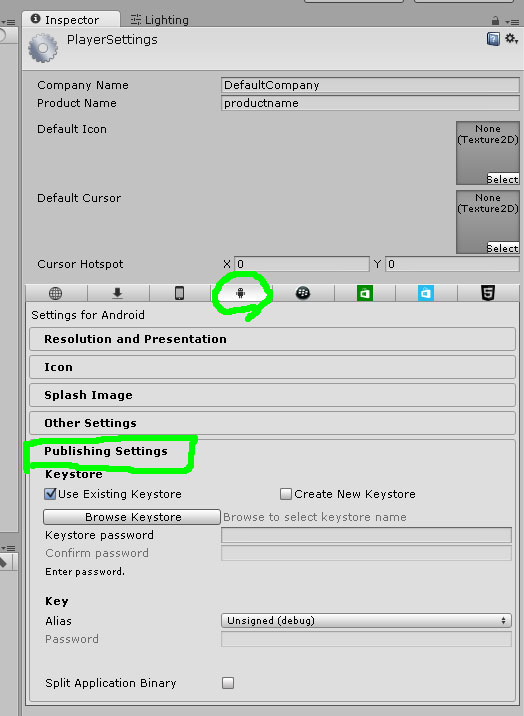
– Click button “Player Settings” (image#1)
– Select “Publishing Settings” (image#2)
– Click [x] Create New Keystore
– Click Browse Keystore
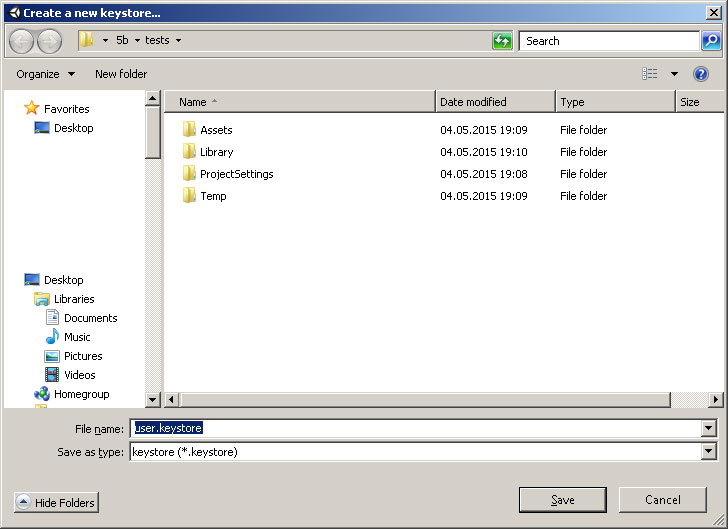
– “Create a new keystore” Save the file to default location (image#3)
– Enter Keystore password:
– Enter Confirm password: (*same as above^)
– From the Key, Alias dropdown, select “Create new key” (image#4)
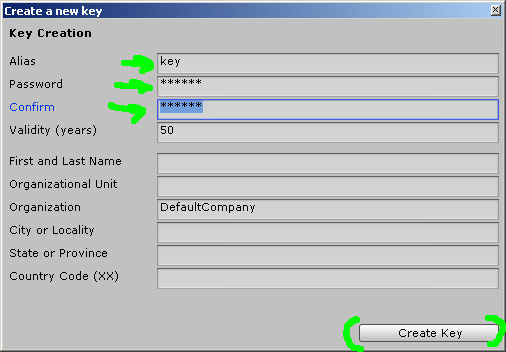
– Fill in the details (only alias & passwords are required, but fill in the rest also. Use same password that you used above^) (image#5)
– Click “Create key” button
– From the Key, Alias dropdown, select “youralias” *It displays the alias here which you entered above^
– Done!
—
Docs:
– http://docs.unity3d.com/Manual/class-PlayerSettingsAndroid.html
—
Image#1: Player settings

—
Image#2: Android / Publishing settings
—
Image#3: Creating new keystore
—
Image#4: Select create new key

—
Image#5: Creating new key


Related Posts


2 Comments + Add Comment
Leave a comment
Recent posts
- Editor Tool: Property Watcher
- .unityignore : Hide files from Project window
- PostBuild Script to Create Single exe Standalone File
- Game Loop Designer
- Favorites in PackageManager
- LudumDare59 : Signal
- Unity Editor: Tree Generator
- Leaf/Foliage Generator Tools (Runs in Browser)
- Testing Unity AI Beta
- Ways to Support UnityCoder Development
- Using UI Slider to Create 5-Star Rating Element
- Game Music Library For Unity (editor plugin)
Connect


Recent Comments
Coin:
CUgDSbRqFcAumDSAcdKDvuXsw26VdkJe8C8WGUQHBAGS
Very simple with eclipse
Thanks! very helpful!