14
2012
Rampart Prototype
 An article by
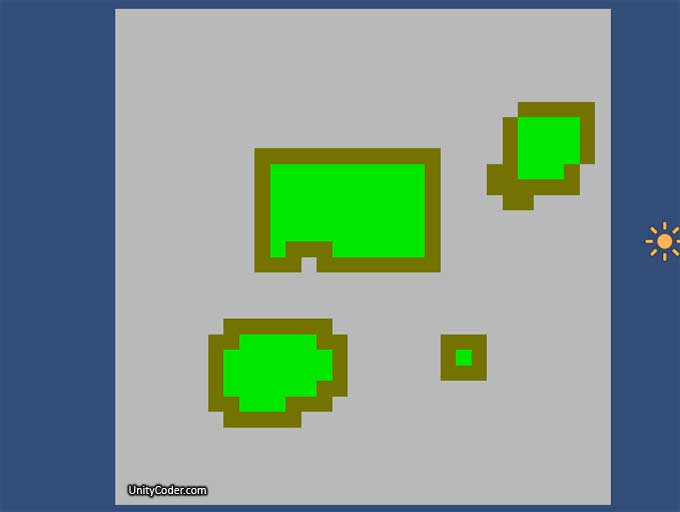
Basic “seed fill” is now working (see the link for some info). Idea is to make small Rampart style test game.
– Using alexzzz’s c# fast floodfill (see previous post comments section for source)
– Area is now checked everytime you paint a pixel, if closed areas are founded, set their color to green.
#Update:1
– Added script sample, added Image#3, Image#4, Webplayer v2.0
Done:
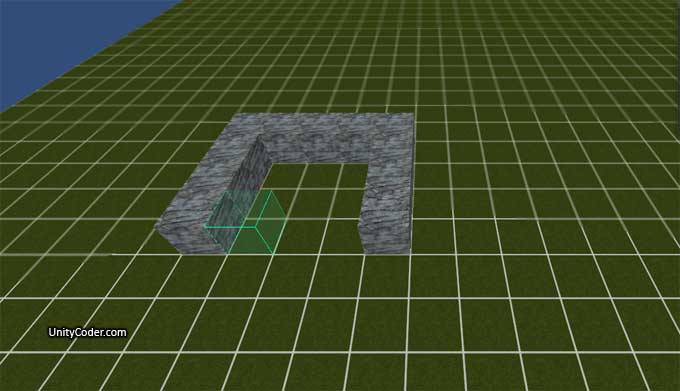
– Use 3D view instead (see image#2 below) *done
– Add floodfill to that, for now: instantiate founded inside floor pieces as invidual blocks.. *done (later create single floor mesh by code?)
– Add diagonal fill? (not yet)
– Can place walls, cannons can be placed only on floor areas
– Flood gets added by flood fill
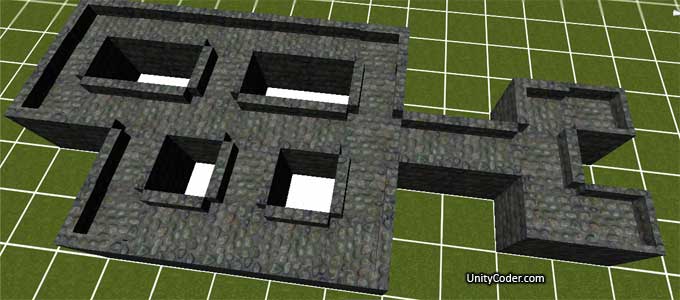
– Connect neighbour walls (change the mesh, when user adds new piece next to it) *See image#5 below
– Create object[] array? (for checking what object is at the specific grid cell..or just raycast?) : Now using object[] array.
– Destruction? How? And how to remove floor when piece of wall is destroyed? : Objects are in array, easier to keep track..
– Basic enemies (for testing) : v3.0, added random wall destruction, now if wall is destroyed, you lose castle area..
– Added: Cannon gets destroyed, if its not inside castle.
TODO:
– Cannons are not yet saved anywhere..(can place multiple at the same spot..)
– Optimization: Too many objects.. Each floor piece is invidual plane, walls are invidual blocks, build mesh instead?
– Resources? Have to mine ore / stone / gold?
– Better camera controls
– 3D grid? Could build higher walls..?
– More enemies (for testing, for example balls that roll toward your castle, you need to place cannons to destroy them)
– Cannons that shoot with physics or precalculated path?
.
Webplayer:
http://unitycoder.com/upload/demos/Rampart_prototype_unity/ (v1.0 : seedfill test)
http://unitycoder.com/upload/demos/Rampart_prototype2_unity/ (v2.0 : 3D scene test)
http://unitycoder.com/upload/demos/Rampart_prototype3/ (v3.0 : can build, area is calculated, random walls are destroyed..)
.
Purchase Current Version Source (same features as v3.0 webplayer)
1eur [digishop id=”7″]
*Note: Has bugs, not too many comments included (feel free to ask), not finished etc.
**Note: If the download link is broken, email me and I’ll send a new one : 
—
Image#2: 3D view for placing the walls (current features: zoom in/out, rotate view, place walls)
—
Script #1: When user inserts a new wall, check neighbour cells (above-right-bottom-left) and then place a prefab that connects to neighbours (v1.0).. Seems bit complicated and its still missing the neighbour cell updates, to make them connect to the new piece also)
// get 'unique' value for all surrounding cells added together
var cells:int = walls[x,y+1];
cells += walls[x+1,y]*4;
cells += walls[x,y-1]*8;
cells += walls[x-1,y]*16;
var wallIndex:int=0; // default wall
switch (cells)
{
case 0: wallIndex = 9; break;
case 1: wallIndex = 13; break;
case 4: wallIndex = 14; break;
case 8: wallIndex = 15; break;
case 16: wallIndex = 12; break;
case 20: wallIndex = 10; break;
case 9: wallIndex = 11; break;
case 5: wallIndex = 6; break;
case 17: wallIndex = 4; break;
case 12: wallIndex = 8; break;
case 24: wallIndex = 2; break;
case 28: wallIndex = 1; break;
case 25: wallIndex = 3; break;
case 21: wallIndex = 5; break;
case 13: wallIndex = 7; break;
case 29: wallIndex = 0; break;
}
// create wall
Instantiate(wallPrefabs[wallIndex], gridPosition, wallPrefabs[wallIndex].rotation);
// TODO: change neighbour walls to connect this new wall
// all 0-4 neighbour walls should do the same as above, check neighbour cell values
// and then replace it with correct block that connects to all of them..?
Image#3: Values received from the script above, when use inserts a wall in the middle, based on that value we pick what prefab to use..
(# = wall, diagonal neighbours are not checked)

—
Image#4: Wall prefab wallIndex’es:

—
Image#5: Walls now connect to neighbour walls


Related Posts


10 Comments + Add Comment
Leave a comment
Recent posts
- Favorites in PackageManager
- LudumDare59 : Signal
- Unity Editor: Tree Generator
- Leaf/Foliage Generator Tools (Runs in Browser)
- Testing Unity AI Beta
- Ways to Support UnityCoder Development
- Using UI Slider to Create 5-Star Rating Element
- Game Music Library For Unity (editor plugin)
- Fontastic : Easily Test Fonts in Unity Editor!
- GeoTiff Importer & Terrain Generator for Unity
- Create Baked DropShadow for UI images
- .JP2 Ortho Image Converter to PNG/JPG/TIFF
Connect


Recent Comments
- on Mesh Exploder (sources)
- on Sprite Sheet Flip Book Shader
- on Sprite Sheet Flip Book Shader
- on [Asset Store] PolygonCollider2D Optimizer
- on Trajectory Test Scene 2.0
- on Vector3 maths for dummies!
- on UnityHub 3.6.0: Remove Version Control & Cloud Dashboard columns
- on Using RenderDoc with Unity (graphics debugger)
Coin:
CUgDSbRqFcAumDSAcdKDvuXsw26VdkJe8C8WGUQHBAGS
Added webplayer (2.0)
Added webplayer (3.0)
Tutorial pls? 🙂
I think this version is too bugged to be much of use..:/
Any specific part that you are interested in?
About checking neighbours and placing the right part 😀 idk. Hey is it hard to code this? 🙂
Most interested in this:
‘- Connect neighbour walls (change the mesh, when user adds new piece next to it) *See image#5 below’
🙂 🙂
Where I can find playable demo?
This one is the latest version (not finished..)
http://unitycoder.com/upload/demos/Rampart_prototype3/
Using Tile Masks to Set a Tile’s Type Based on Its Surrounding Tiles:
http://gamedevelopment.tutsplus.com/tutorials/using-tile-masks-to-set-a-tiles-type-based-on-its-surrounding-tiles–gamedev-783
Implementing Auto-tiling Functionality in a Tile Map Editor:
http://www.codeproject.com/Articles/106884/Implementing-Auto-tiling-Functionality-in-a-Tile-M